NSX 4.2 Multitenancy Series – Part 1: Introduction

What is Multi-tenancy?

Multi-tenancy is an architecture in which a single software application instance serves multiple customers, each called a tenant. A multi-tenant architecture allows several instances of an application to function in a shared environment. This design works because each tenant is physically integrated but logically independent. This means that a single instance of the software will run on one server and then serve multiple tenants.

Multi-tenancy in VMware NSX

Although Multi-tenancy was first introduced in NSX 4.0.1, it has been available at the data plane layer for several years. VMware NSX uses multi-tiered routing model with logical separation between the different gateways (tier-0 & tier-1) to provide networking connectivity, and these gateways, when deployed as per a specific design, provide isolation to user apps from each other.

For e.g, features like VRF, that allows for having a separate routing domain per tenant, or deploying Tier-1 gateways per application/environment (dev/test/prod) to achieve segmentation.Read the rest

How to Force Delete a Stale Logical Segment in NSX 3.x

I ran into a problem recently when disabling NSX in my lab where I couldn’t remove a logical segment. This logical segment was previously attached to NSX Edge virtual machines. The logical segments still had a stale port, even after the Edge virtual machines were deleted.

Any attempt to delete the segment through UI/API resulted in the error Segment has 1 VMs or VIFs attached. Disconnect all VMs and VIFs before deleting a segment.” 

GUI Error

API Error

So how do I delete the stale segments in this case? The answer is through API, but before deleting the segments, you must delete the stale VIFs. 

Follow the procedure given below to delete stale VIFs.

1: List Logical Ports associated with the Stale Segment

This API call will list all segments. You can pass the segment uuid in the above command to list a specific segment (stale one).Read the rest

Quick Tip: Configure NSX Manager GUI Idle Timeout

The NSX Manager Web-UI has a default timeout of 1800 seconds. i.e., the NSX Manager UI will time out after 30 minutes of inactivity. This timeout looks reasonable for a production deployment, but since security is not an issue in lab settings, you might want to change it to a little bit higher. On top of that, it is annoying to get kicked out of the UI after 30 minutes of idle session.

In this post, I will demonstrate how you can change the timeout value.

Run the command get service http to see the currently configured value:

Run the command set service http session-timeout 0 to fully remove the session timeout.Read the rest

NSX-T Routing With OSPF

Introduction

NSX-T 3.1.1 introduced support for OSPFv2 routing protocol for Tier-0 gateways. This feature was one of the most awaited features for some time. The introduction of OSPF to NSX-T solves one of the major hindrances that was stopping customers from migrating to NSX-T.

There are lots of customers who are still running NSX-V in their environment and OSPF as routing protocol used in their infrastructure. Now since NSX-T supports OSPF, customers can do a greenfield deployment of NSX-T and switch workloads from NSX-V to NSX-T using the L2 bridge and without much changes to their physical network.

Since this feature is pretty new, it will be interesting to see how soon customers adopt this in their environment. 

Disclaimer: This post is inspired by an original blog post written by  Peter Milchov

Before jumping into the lab, let’s revisit some important facts associated with OSPF support.

  • NSX-T 3.1.1 supports OSPFv2 only.
Read the rest

NSX-T VRF Lite with VCD 10.2

VMware Cloud Director 10.2 release introduced key features in the networking and security areas and bridged the gap between VCD and NSX-T integration. In this release of VCD, the following NSX-T enhancements are added:

  • VRF Lite support
  • Distributed Firewall
  • Cross-VDC networking
  • NSX Advanced Load Balancer (Avi) integration

These improvements will help partners expand their network and security services with VMware Cloud Director and NSX-T.

In this post, I will be talking about tenant networking using NSX-T VRF Lite.

One of the key components in VCD networking is External Network which provides uplink connectivity to tenant virtual machines to allow them to talk to the outside world (Internet, VPN etc). External networks can be either

  • Shared: Allowing multiple tenant edge gateways to use the same external network.
  • Dedicated: One-to-one relationship between the external network and the NSX-T edge gateway, and no other edge gateways can connect to the external network.

Dedicating an external network to an edge gateway provides tenants with additional edge gateway services, such as Route Advertisement management and BGP configuration.Read the rest

Load Balancing VMware Cloud Director with NSX-T

Recently, I tested NSX-T 3.1 integration with VCD 10.2 in my lab and blogged about it. It was a simple single-node deployment, as I was testing the integration. Later, I scaled my lab to 3 nodes and also used the NSX-T load balancer feature to test the load balancing of VCD cells.

To use the NSX-T load balancer, we can deploy VCD cells in 2 different ways:

  • Deploy VCD cells on overlay segments connected to the Tier-1 gateway and configure LB straight away (easy method).
  • Deploy VCD cells on a VLAN-backed port group and load balance them via a dedicated Tier-1 gateway.

In this post, I will demonstrate the second method. Before jumping into the lab, let me show you what is already there in my infrastructure.

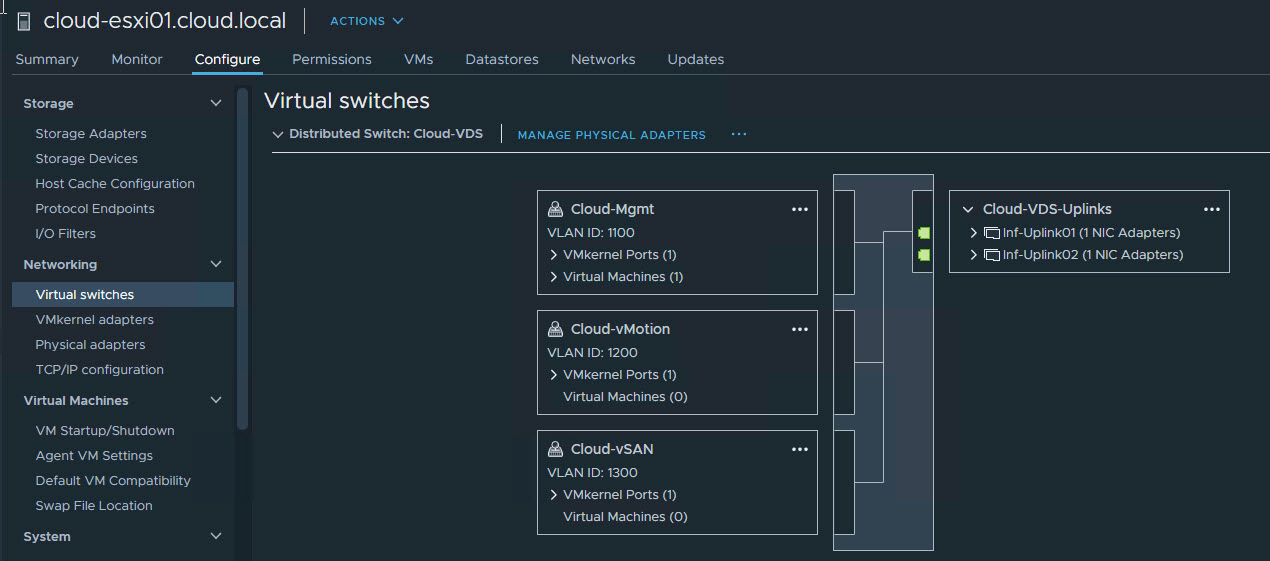
In my lab, NSX-T follows the VDS + NVDS architecture. The management SDDC, where VCD cells are deployed, has a VDS named ‘Cloud-VDS,’ and I have a dedicated distributed portgroup named ‘VCD-Mgmt’ which is backed by VLAN 1800, and all my VCD cells are connected to this portgroup. Read the rest

NSX-T integration with VMware Cloud Director 10

VMware Cloud Director relies on the NSX network virtualization platform to provide on-demand creation and management of networks and networking services. NSX-V has been a building block of VCD infrastructure for quite a long time. With the release of NSX-T Datacenter, VMware clearly mentioned that NSX-T is the future of software-defined networking, and as a result customers slowly started migrating from NSX-V to NSX-T.

NSX-T 2.3 was the first version of  NSX-T which VCD (9.5) supported, but the integration was very basic and there were a lot of functionalities that were not available and it was stopping customers from using NSX-T full-fledged with VCD. NSX-T 2.5 added more functionalities in terms of VCD integration, but it was still lacking some features.

With the release of NSX-T 3.0, the game has changed and NSX-T is more tightly coupled with VCD and thus customers can leverage almost all functionalities of NSX-T with VCD. Read the rest

NSX-T Federation-Part 4: Configure Stretched Networking

Welcome to the fourth part of the NSX Federation series. In the last post, I talked about configuring local and global NSX-T managers to enable federation. In this post, I will show how we can leverage it to configure stretched networking across sites. 

If you have missed the earlier posts of this series, you can read them using the links below:

1: NSX-T Federation-Introduction & Architecture

2: NSX-T Federation-Lab Setup

3: Configure Federation

NSX-T Federation Topology

Before diving into the lab, I want to do a quick recap of the lab topology that I am building.

The following components in my lab are already built out:

1: Cross Link Router: This router is responsible for facilitating communication between Site-A & Site-B SDDC/NSX.

  • Site-A ToR01/02 are forming BGP neighborship with the Cross Link Router and advertising necessary subnets to enable inter-site communication.
  • Site-B ToR01/02 are also BGP peering with the Cross Link Router and advertising subnets. 
Read the rest

NSX-T Federation-Part 3: Configure Federation

Welcome to the third post of the NSX Federation series. In part 1 of this series, I discussed the architecture of the NSX-T federation, and part 2 was focused on my lab walkthrough.

In this post, I will show how to configure federation in NSX-T.

If you have missed the earlier posts of this series, you can read them using the below links:

1: NSX-T Federation-Introduction & Architecture

2: NSX-T Federation-Lab Setup

Let’s get started.

Federation Prerequisites

Before attempting to deploy and configure federation, you have to ensure that the following prerequisites are in place:

  • There must be a latency of 150 ms or less between sites.
  • Global Manager supports only Policy Mode. The federation does not support Manager Mode.
  • The Global Manager and all Local Managers must have NSX-T 3.0 installed.
  • NSX T Edge Clusters at each site are configured with RTEP IPs.
  • Intra-location tunnel endpoints (TEP) and inter-location tunnel endpoints (RTEP) must use separate VLANs.
Read the rest

NSX-T Federation-Part 2: Lab Setup

In the first part of the NSX-T federation series, I discussed about architecture and components of the federation and also discussed some use cases. In this post, I will explain my lab topology before diving into the NSX-T Federation configuration.

I am trying to setup a federation between 2 sites in my lab and on both sites, I have already deployed the following:

  • vSphere 7 (ESXi & vCenter).
  • vSAN for shared storage.
  • NSX-T 3.0 Manager.
  • NSX-T 3.0 Edges.

I have 4 ESXi hosts on each site, and each ESXi has 4 physical NICs. All 4 NICs are connected to a trunked port on ToR.

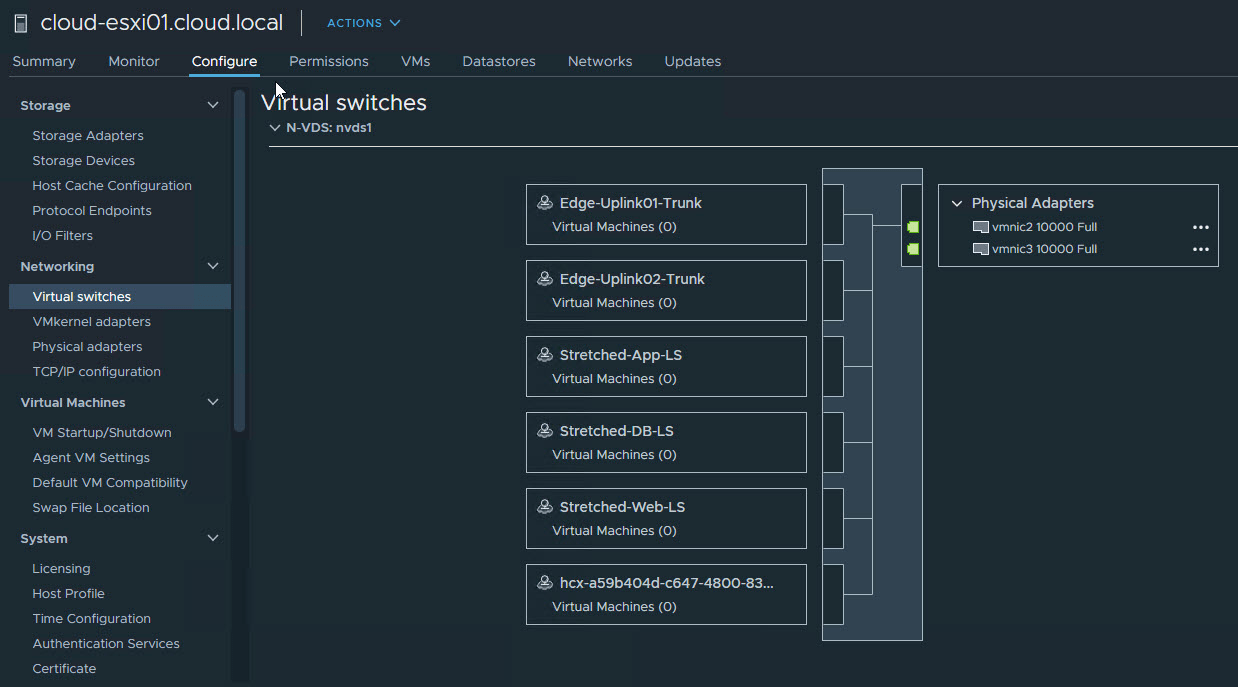
The networking architecture in my lab is a mix of VDS and N-VDS. 

2 NICs from each host are participating in routing regular datacenter traffic (Mgmt, vSAN & vMotion). 

The other 2 NICs are connected to N-VDS and carry overlay traffic. 

For edge networking, I am using multi-tep, single NVD-S architecture.Read the rest