vCloud Availability for vCloud Director: Part 3-VCAV Deployment

In the last post of this series, we discussed the logical architecture of VCAV and the components that constitute the VCAV stack.

In this post, we will be deploying the VCAV appliance. The current version of VCAV is 2.0.1, and it can be downloaded from here. vCloud Availability appliance deployment is a straightforward task and is pretty much like any other standard OVA deployment. 

Connect to your management vCenter Web Client and choose to Deploy OVF Template and browse to the location where the VCAV OVA file is stored on your system.

Review the OVA details and hit next to continue.

Accept the EULA and hit Next.

Provide a name for the VCAV VM and select the data center where it will be deployed.

Select the cluster where the VM will be deployed and click Next.

For prod deployment, a thick-provisioned disk is recommended. For lab deployment, a thin-provisioned disk works fine.Read the rest

vCloud Availability for vCloud Director-Part-2-Architecture & Components

In the first post of this series, we discussed what the vCloud Availability solution is. In this post, we will discuss the architecture of VCAV and the components needed to create a DRaaS solution using VCAV.

vCloud Availability Logical Architecture

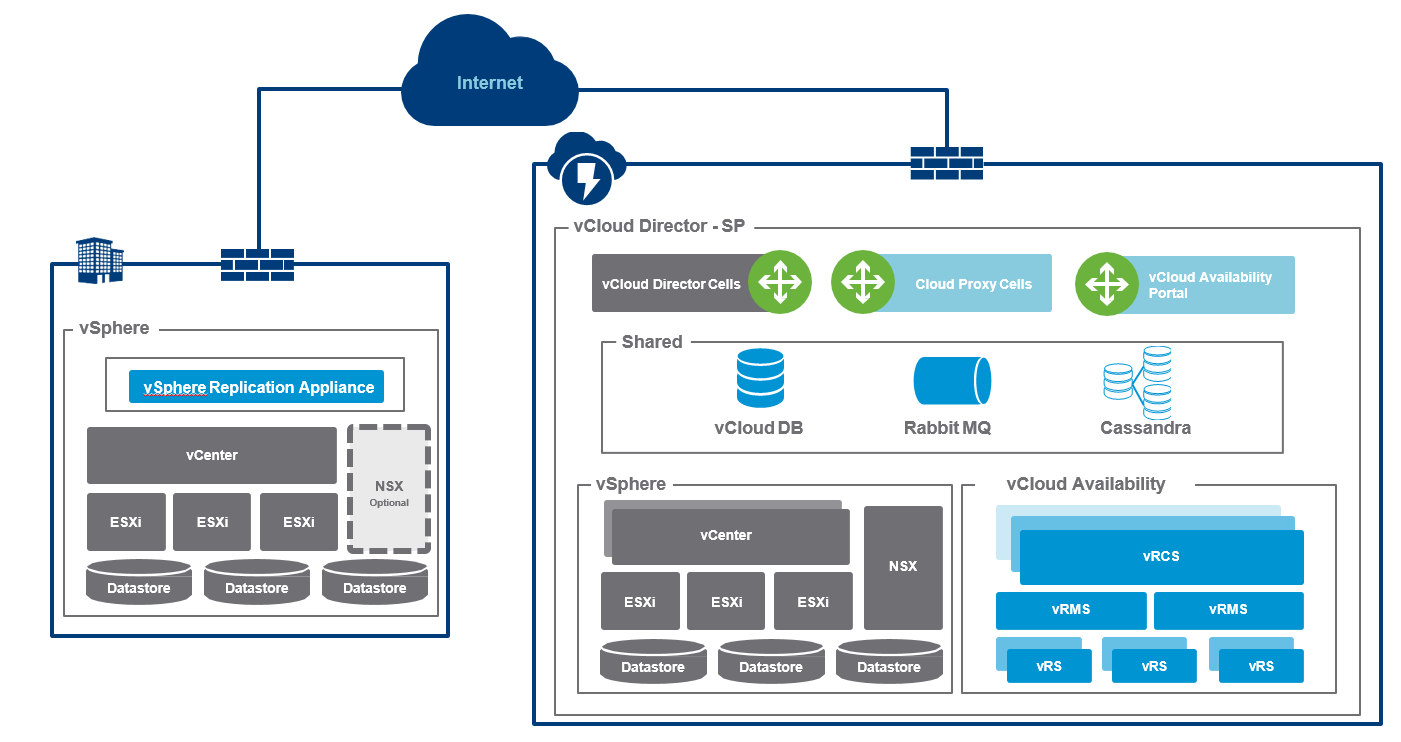
The architecture relies solely on the service provider environment. There can be slight differences in components that different service provider uses. Typical components can include what is visible in the diagram below.

Components shown in gray are the components that the tenant and service provider have already deployed. Colored components are the ones that we will be deploying later in this series.

vCloud Availability Components

The table below explains a high-level overview of the components that are needed for setting up a VCAV environment.

And that’s it for this post. In the upcoming posts of this series, we will deploy these components one by one.

I hope you find this post informative.Read the rest

vCloud Availability for vCloud Director-Part-1-Introduction

What is vCloud Availability for vCloud Director (VCAV) ?

vCloud Availability for vCloud Director is a Disaster Recovery-as-a-Service (DRaaS) solution that provides simple and secure asynchronous replication and failover for vSphere managed workloads.

VMware released vCloud Availability for vCloud Director keeping in mind to provide cloud innovations to vCloud Air Network partners so that they can implement this software solution to provide Disaster Recovery as a Service (DRaaS) to customers.

Customer’s who are using vCloud Air, knows that vCloud Air uses vSphere Replication to provide the DRaaS service to their customers. This is a very similar solution which vCAN partners will now be using for DRaaS. 

Since vCloud Air is not present in all regions,  vCloud Availability will be a blessing for vSphere customers because they can now buy and use DRaaS service from a local partner.

In last 3-4 years there is a shift in technology as more and more customer are now adopting to cloud solutions.Read the rest

Learning NSX-T-Part 10: Logical Routing

In the last post of this series, we created logical switches and established communication between the App and Web VMs, which were on the same subnet and connected to the same logical switch.

In this post, we will learn about logical routing.

If you are not following along with this series, then I recommend reading earlier posts of this series from the links below:

1: Introduction to NSX-T

2: NSX-T Architecture

3: NSX Manager Deployment

4: NSX Controllers Automated Deployment

5: NSX Controllers Manual Deployment

6: Prepare Esxi host to form NSX-T Fabric

7: Configuring Uplink Profile

8: Configuring Transport Zone and Transport Nodes

9: Creating Logical Switches and Testing Connectivity

Optimal routing is one of the biggest challenges in any data center, and NSX revolutionized the way networking is used in infrastructure. 

NSX-v offered distributed routing to SDDC, and because of this, routing between different subnets on an ESXi hypervisor can be done in the kernel, and traffic never has to leave the hypervisor, thus eliminating the traffic hairpinning problems.Read the rest

Learning NSX-T-Part 9:Creating Logical Switches and Testing Connectivity

In the last post of this series, we configured transport zones and transport nodes. We discussed the modes of transport zone and N-VDS.

In this post, we will learn how to create logical switches in NSX-T, and we will test connectivity between VMs attached to the same logical switch.

If you are not following along with this series, then I recommend reading earlier posts of this series from the links below:

1: Introduction to NSX-T

2: NSX-T Architecture

3: NSX Manager Deployment

4: NSX Controllers Automated Deployment

5: NSX Controllers Manual Deployment

6: Prepare Esxi host to form NSX-T Fabric

7: Configuring Uplink Profile

8: Configuring Transport Zone and Transport Nodes

A logical switch provides layer 2 connectivity for the virtual machines that are attached to it. In the last post, we discussed that transport zones are of two types (overlay and VLAN), and the type of logical switch is based on which type of transport zone it connects to. Read the rest

Learning NSX-T-Part 8:Configuring Transport Zone and Transport Nodes

In the last post of this series, we discussed uplink profiles. In this post, we will be learning about transport zones and their types.

If you are not following along with this series, then I recommend reading earlier posts of this series from the links below:

1: Introduction to NSX-T

2: NSX-T Architecture

3: NSX Manager Deployment

4: NSX Controllers Automated Deployment

5: NSX Controllers Manual Deployment

6: Prepare Esxi host to form NSX-T Fabric

7: Configuring Uplink Profile

What is a transport zone in NSX-T?

As per vmware documentation

A transport zone is a container that defines the potential reach of transport nodes. Transport nodes are hypervisor hosts and NSX Edges that will participate in an NSX-T overlay.

What is meant by the above is that if two or more ESXi hosts that are configured as transport nodes participate in the same transport zone, then VMs on these different hosts using the overlay network can communicate with each other.Read the rest

Learning NSX-T-Part 7:Configuring Uplink Profile

In the last post of this series, we prepared the ESXi host for NSX-T and ensured that the host’s connection to the NSX manager was up and all necessary VIBs had been pushed on the hosts.

In this post, we will learn about the uplink profile.

If you are not following along with this series, then I recommend reading earlier posts of this series from the links below:

1: Introduction to NSX-T

2: NSX-T Architecture

3: NSX Manager Deployment

4: NSX Controllers Automated Deployment

5: NSX Controllers Manual Deployment

6: Prepare ESXi host to form NSX-T Fabric

What is an uplink profile in NSX-T?

From VMware documentation:

An uplink profile defines policies for the links from hypervisor hosts to NSX-T logical switches or from NSX Edge nodes to top-of-rack switches.

Uplink profile is similar to specifying the teaming policy when you enable VXLAN on an ESXi host in NSX-v. The settings that you can define in an uplink profile are teaming policies, active/standby links, the transport VLAN ID, and the MTU setting.Read the rest

Learning NSX-T-Part 6: Host Preparation and forming NSX-T Fabric

In the last 2 posts of this series, we discussed the automated and manual deployment of NSX controllers and how to form a controller cluster. In this post, we will learn how to do host preparation for NSX-T.

If you are not following along with this series, then I recommend reading earlier posts of this series from the links below:

1: Introduction to NSX-T

2: NSX-T Architecture

3: NSX Manager Deployment

4: NSX Controllers Automated Deployment

5: NSX Controllers Manual Deployment

When we perform host preparation, NSX-T pushes a few vibrations on the ESXi host (just like NSX-v), and once the hosts are prepared, they are known as fabric nodes. All ESXi hosts that are fabric nodes have NSX-T modules installed and are registered with the NSX-T management plane.

Before jumping into the host preparation task, ensure that the install-upgrade service status on the NSX-T Manager is reporting as ‘running.’ If this service is down, the NSX Manager won’t be able to push the VIBs onto the ESXi hosts when we add them to the fabric.Read the rest

Learning NSX-T-Part 5: NSX Controllers Manual Deployment & Clustering

In last post of this series, we learnt how to deploy NSX-T controllers automatically via NSX manager and we saw its pretty much same as deploying controllers in a NSX-V environment. 

In this post we will learn how to deploy the NSX controllers manually. 

If you are not following along this series, then I recommend reading earlier posts of this series from below links:

1: Introduction to NSX-T

2: NSX-T Architecture

3: NSX Manager Deployment

4: NSX Controllers Automated Deployment

Manual steps are a bit lengthy and complex so we have to be careful with the sequence of commands which we will be running to form controllers cluster. Before deploying the controller nodes, make sure following prerequisites are met:

  • vCenter Server and ESXi hosts are deployed.
  • Esxi hosts have been added to vCenter and networking and storage configuration on hosts are in place. 
  • NSX Manager is deployed.
  • ESXi host must have enough CPU, memory, and hard disk resources to support controller deployment.
Read the rest

Learning NSX-T-Part 4: NSX Controllers Automated Deployment & Clustering

In last post of this series we deployed the NSX manager appliance. In this post we will learn how to deploy the NSX-T controller nodes.

If you are not following along this series, then I recommend reading earlier posts of this series from below links:

1: Introduction to NSX-T

2: NSX-T Architecture

3: NSX Manager Deployment

There are 2 methods of deploying NSX controllers for vSphere integration with NSX-T:

  • Automated Installation of Controller from NSX Manager
  • Manual Installation of NSX Controller on ESXi via GUI or OVF tool

In this post we will not talk about controller deployment for non-vSphere infrastructure.

Also in this post we will be discussing only about Automated method for controllers. Manual installation will be covered in Next post of this series.

In order to deploy NSX controllers to consume NSX-T for your vSphere infrastructure, make sure following prerequisites are met:

  • vCenter Server and ESXi hosts are deployed.
Read the rest