
Welcome to the 7th part of the VMware vDefend SSP series. In the previous post, I discussed the SSP Segmentation Report feature and how you can leverage it to plan micro-segmentation. This post will provide a high-level overview of the security intelligence feature and the security journey workflow.
If you are not following along with this series, I encourage you to read the earlier parts of this series from the links below:
1: Introduction to VMware vDefend Security Services Platform
2: Deploy & Configure SSP Instance
3: Onboard NSX Manager & Activate Platform Features
4: SSP Integration with Core Infrastructure Services
6: Security Segmentation Report
Security Intelligence is an SSP feature that provides tools for planning network segmentation, visualizing traffic patterns, and monitoring data flows across applications, enabling the planning and implementation of micro-segmentation at scale.
Security Intelligence delivers two primary capabilities:
- Visual representation of network components, including security groups, virtual machines, IP addresses, and traffic flows. This visualization is based on network flow data collected over a specified time frame.
- Suggested configurations for security policies, firewall rules, security groups, and application services. These suggestions help implement application-level micro-segmentation. By acting on these suggestions, organizations can establish more adaptive security controls that reflect the actual communication behaviors observed among virtual machines and IP addresses within their infrastructure.
Note: Security Intelligence monitors network flows of the vSphere clusters where data collection is enabled.

VMware vDefend Security Journey Workflow
VMware vDefend implements a Security Journey workflow—a staged approach for progressively adopting Zero Trust security in an SDDC. The workflow is designed around the DFW 1-2-3-4 framework (Distributed Firewall stages). The security journey workflow can be launched from the SSP home page.

The various stages in the security journey are:
Stage 1: Discovery & Assessment
The Discovery & Assessment stage helps in:
- Gain complete visibility into the environment and understand application communication patterns before creating policies.
- Generate a security segmentation report with the current segmentation score.
- Identify gaps and opportunities for improvement.
- The analytics engine discovers communication patterns and identifies unprotected traffic.
In stage 1, you activate the security intelligence feature and generate a score for the current security posture, followed by a security segmentation report.


Stage 2: Infrastructure Protection
- Securing core and shared infrastructure services (including DNS, LDAP, NTP, Syslog, and more).
- Protect critical VCF components (SDDC Manager, vCenter, NSX Managers).
Stage 2 relies on CSV ingestion, where you upload a CSV workbook containing infrastructure assets (VMs/segments/groups, etc.). The system combines CSV file information with automated detections to produce comprehensive rules.
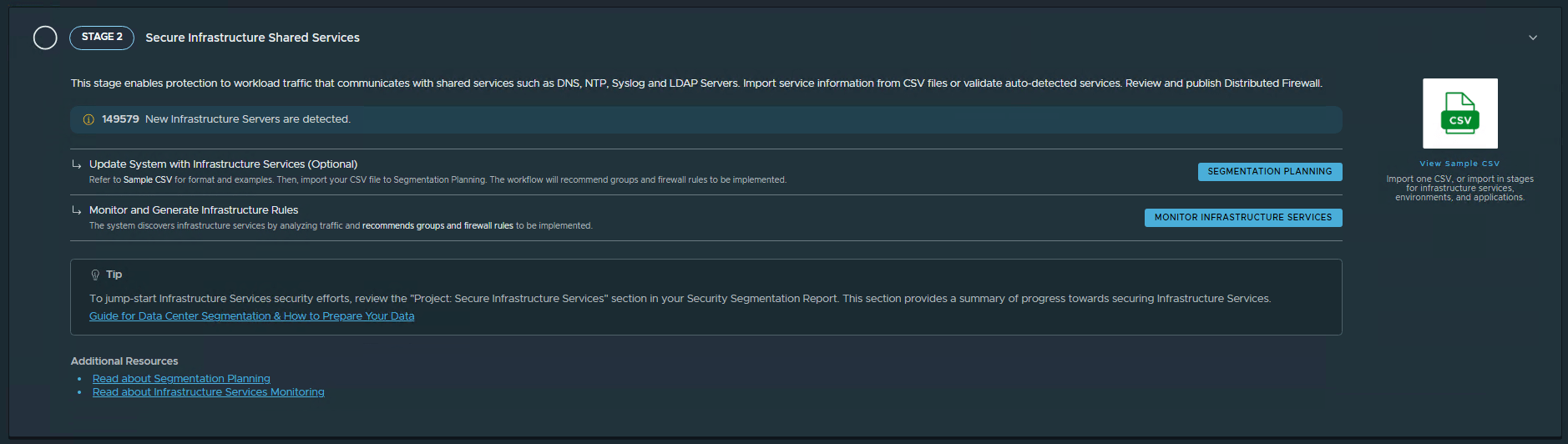
Stage 3: Zone-Based Segmentation
This stage involves dividing the data center into broader security zones such as production, development, or testing environments. Using a CSV file, administrators specify which VMs, IP addresses, DVPGs, and segments belong to each zone. Security Intelligence then creates groups and applies tags based on this information. This stage helps in:
- Establish broad, macro-level segmentation between major security zones to limit blast radius.
- Create security boundaries between different zones.
- Secure traffic between organizational segments.
Stage 4: Application-Level Micro-segmentation
This final stage implements granular microsegmentation for individual applications using CSV files to define and tag applications, similar to environment segmentation. The microsegmentation process includes:
1: Segmentation Strategies: Users can choose between two predefined approaches:
- Application Ring-Fencing: Permits all intra-application traffic while enabling controlled access to other applications through predefined rules and a default rule.
- Application Microsegmentation: Uses a predefined default rule to permit all incoming and outgoing traffic initially.
2: Traffic Analysis: Security Intelligence analyzes traffic not explicitly defined by these strategies and provides granular recommendations based on application tiers identified in the CSV file.
3: Monitoring: Applications are continuously monitored. The flow count for an application increases whenever application-related traffic matches a default allow rule—whether in the global section, a group-specific section, or a custom monitored rule. Administrators should define a comprehensive segmentation strategy, including inbound and outbound traffic policies, before generating recommendations.
Conclusion
The workflow provides a single, unified guide through segmentation planning; auto-tagging and grouping; continuous monitoring of pre- and post-deployment of DFW rules; and alerting on changes to enforcement. This workflow provides several benefits, including:
- Tag-based security groups (not IP-based).
- Real-time segmentation assessment.
- Automated policy recommendations.
- Pre/post-deployment monitoring.
And that’s it for this post.
In the next post of this series, I will discuss segmentation planning. Stay tuned!!!
I hope you enjoyed reading this post. Feel free to share this post on social media if it’s worth sharing.