
Traditional data centre security has long relied on a perimeter-based approach—imagine a castle with high walls and a single guarded entrance. This model worked well when applications lived in predictable locations and traffic patterns were relatively simple. However, today’s dynamic, cloud-native environments have fundamentally changed the game.
Modern applications span multiple clouds, containers spin up and down in seconds, and workloads migrate freely across infrastructure. The traditional perimeter has dissolved. Attackers who breach the perimeter can move laterally through the network with alarming ease, exploiting the lack of internal segmentation. This is where the VMware vDefend Security Services Platform (SSP) revolutionizes the approach to network security. vDefend SSP simplifies how organizations achieve zero-trust and private cloud security goals by cutting through complexity and providing a comprehensive lateral security implementation.
vDefend Security Services Platform
VMware vDefend SSP is a software-defined, hypervisor-integrated security solution architected to protect VCF private cloud workloads—including both critical and non-critical workloads. The SSP is a highly scalable platform that hosts vDefend security features, including:
- Security Intelligence
- Network Detection and Response (NDR)
- Malware Prevention Service (MPS)
- Network Traffic Analysis (NTA)
- Security Segmentation Reports
Note: SSP replaces the older NSX Application Platform (NAPP) and offers a more streamlined, simplified deployment model with enhanced workflows for security administrators.
Some of the key features of SSP include:
- Rapid Deployment of Distributed Firewall via Security Journey Workflow.
- Distributed Firewall Rule Analysis. Helps in identifying duplicate and superseding rules.
- Importing metadata via CSV files for automated tag assignment and security group creation.
- Distributed Firewall Agent deployment for bare metal workloads.
- Detect Fileless Malware.
SSP provides real-time assessments of security segmentation for zero-trust private cloud initiatives and policy suggestions to close potential security gaps.
The image below, taken from Broadcom’s official documentation, shows a high-level architecture of the SSP platform.
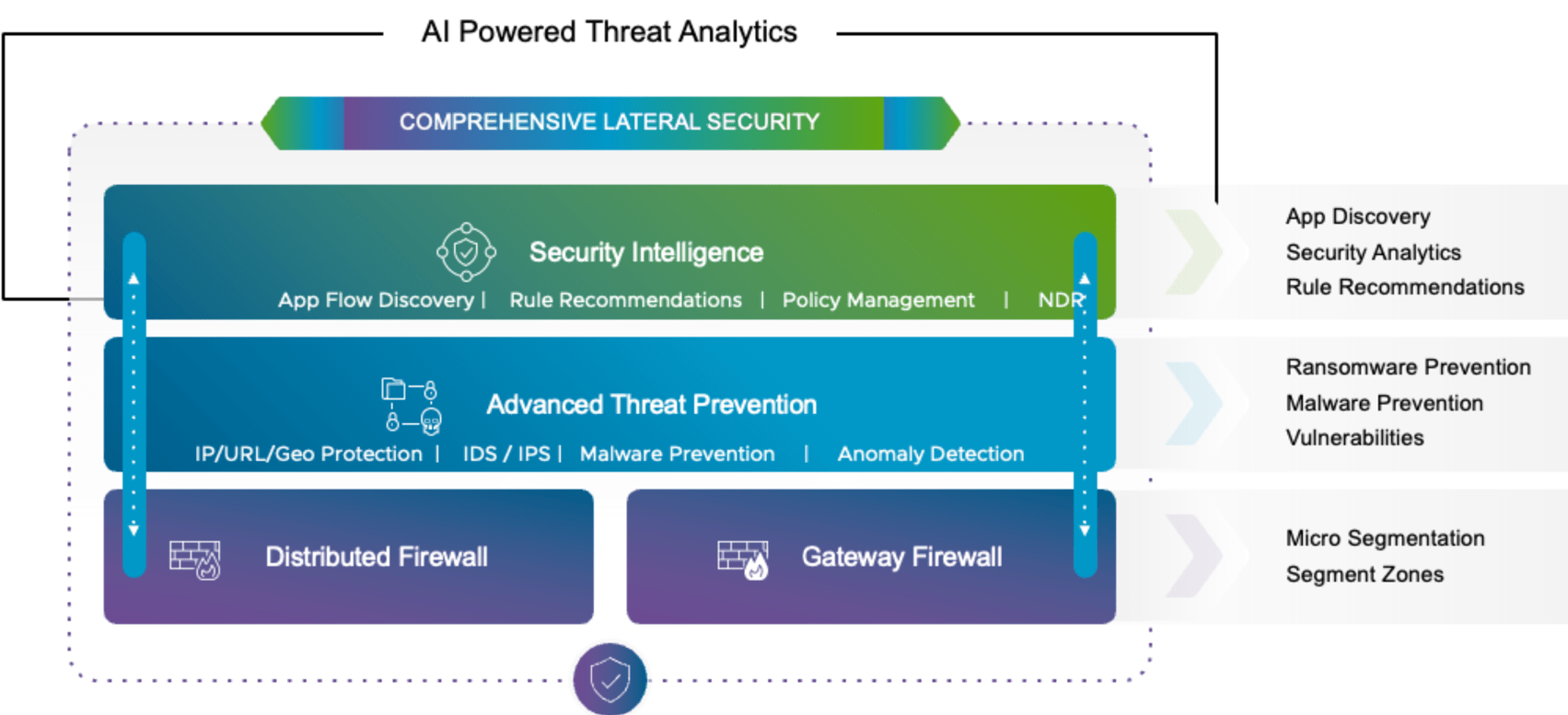
Some of the key benefits of the SSP platform are:
- Simplifies Deployment: Offers an easier deployment process compared to its predecessor, NAPP.
- Enhanced Security: Provides enhanced firewall capabilities and advanced threat prevention (ATP) features.
- Centralized Monitoring: Collects metrics and status events from the vDefend Firewall, ATP, and SSP itself for centralized monitoring and troubleshooting.
- Advanced Threat Prevention: Combines multiple detection technologies, such as Intrusion Detection/Prevention Systems (IDS/IPS) and network sandboxing with NDR for comprehensive threat analysis.
- Security Reporting: SSP helps track security segmentation progress and provides a report demonstrating the effectiveness of security policies.
Components of vDefend Security Services Platform
The two main components of the vDefend SSP are:
- SSP Installer (SSPI): The lifecycle management appliance (deployed as OVA) that automates deployment and management of the SSP instance. The SSP Installer operates a management Kubernetes cluster responsible for provisioning SSP workload cluster instances, monitoring their health status, providing a local Harbor registry for container images, and supplying CLI tools for instance management. The SSP installer provides a web interface to deploy and manage SSP instances.
- SSP Instance: An SSP instance is a self-contained K8 cluster with controllers (control plane) and workers (data plane for security services) that hosts SSP core components. Each instance is managed by a dedicated SSP installer and integrates with a single NSX instance.
In a VCF environment, the SSP installer is deployed in the VCF management domain, and SSP is deployed in the workload domain. The SSP instance currently has a one-to-one mapping with the NSX manager. If your workload domains have dedicated NSX, you would need to deploy an SSP instance in each workload domain.
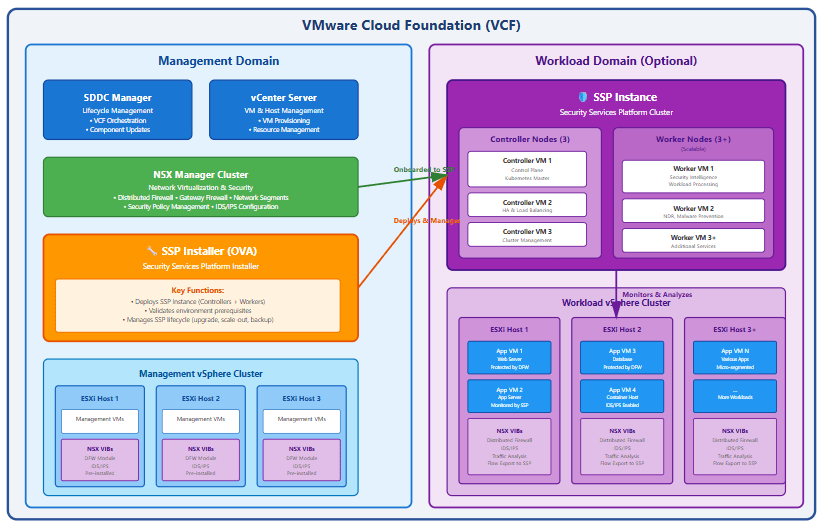
SSP Network Topology
The following image (from Broadcom documentation) shows the sample network placement for the SSP. The SSPI and SSP can be deployed on the same network where other infra components (NSX, vCenter, etc.) are deployed.

In a VCF environment, the SSPI will be deployed on the infrastructure management network in the management domain; the SSP instance can be on a dedicated network in the workload domain, and this network must have reachability from the infra management network.

And that’s it for this post.
In the next post of this series, I will demonstrate the deployment/configuration of the SSPi appliance. Stay tuned!!!
I hope you enjoyed reading this post. Feel free to share this on social media if it’s worth sharing.